
For real estate agents and brokerages

Give your buyers a clear read on the houses they tour.

Your buyer films a short walkthrough of the house. Grainwork turns it into a briefing: what the camera saw, what it couldn’t, and what to ask the inspector. You see the same briefing and add your advice.

Watch the agent demo Email us about a pilot

The demo opens in your browser. No sign-in.A pilot is a short trial with your team.Opens your email app. Or write to support@grainwork.app.

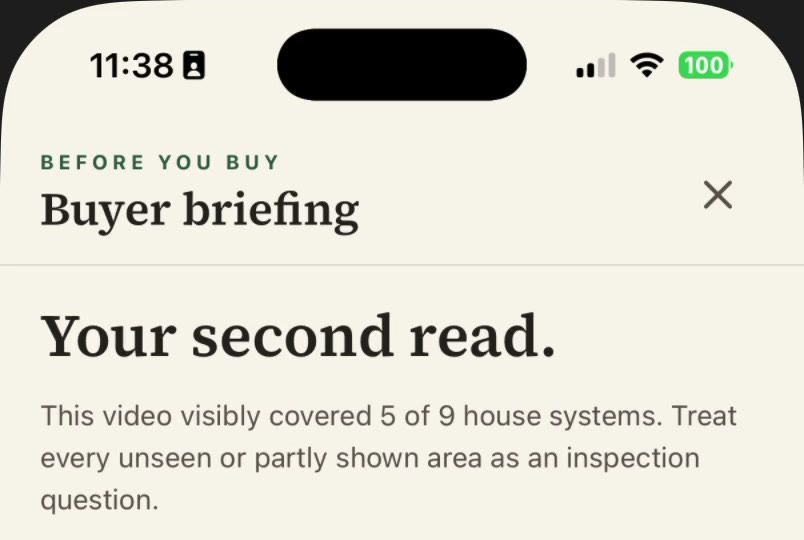
A Grainwork buyer briefing on iPhone. It reads: Before You Buy. Buyer briefing. Your second read. This video visibly covered 5 of 9 house systems. Treat every unseen or partly shown area as an inspection question.
A real Grainwork buyer briefing on iPhone, September 2026. The top says how much of the house the video covered.

What that briefing found

  • 5 of 9home systems showed up in the video
  • 4didn’t show up, so the briefing tells you to ask the inspector
  • 3questions the briefing suggests for the inspector

From the briefing above, written from a real buyer walkthrough. Every house is different.

How it works

From the showing to the inspection.

  1. Send your buyer a link.

    Text your buyer a Grainwork link before the showing. While they’re in the house, and with the seller’s permission, they film a short walkthrough.

  2. Grainwork writes the briefing.

    Grainwork reads the video and writes the briefing: what it saw, what it couldn’t see, and questions for the inspector.

  3. You add your advice.

    You both see the briefing. You add your advice, and the conversation stays with the house.

A Grainwork Professionals page for an example home, 100 Harbor Lane. Notes sit with the house: what the buyers like and what is still to find out about a stain by the kitchen window.
Your notes stay with the house. A Grainwork Professionals screen with example records. Nothing here belongs to a real client.
Pilot

Your name on their phone.

Pilot teams can give their clients their own version of the Grainwork app, with the team’s name and icon. Clients who install your version see your brand.

The regular Grainwork app always says Grainwork.

Today this is a private iPhone pilot with one team.

Pilot

Start a pilot

  • Start with a few agents and the buyers they’re showing homes to.
  • We set it up with you and agree on the length and the price before anything is billed.
  • Your agents use Grainwork Professionals. Your buyers use the Grainwork app.

Working on your own? We can set up a pilot for one agent.

Email us about a pilot

Opens your email app. Or write to support@grainwork.app.
Where it helps

Useful at the moments your clients call you.

From your invitation

After a showing

Your buyer has something to reread that night, and you’re reading the same page when they call.

What your buyer reads: “Treat every unseen or partly shown area as an inspection question.” Further down are the questions to bring to the inspection.

In the app today

When a client asks what a repair costs

They film the problem with Film a Repair in the Grainwork app. They get a price range that lists the hours and materials it assumed.

A real example: replacing chewed door trim came to $510 to $655, including one service visit. It assumed about 3 hours of labor, about 8 feet of trim and $50 of materials. Hours and trim length were estimated from the video, not measured. The labor rate behind this saved example wasn’t kept with it. A contractor prices the real job.

In the app today

When they can’t stop thinking about the kitchen

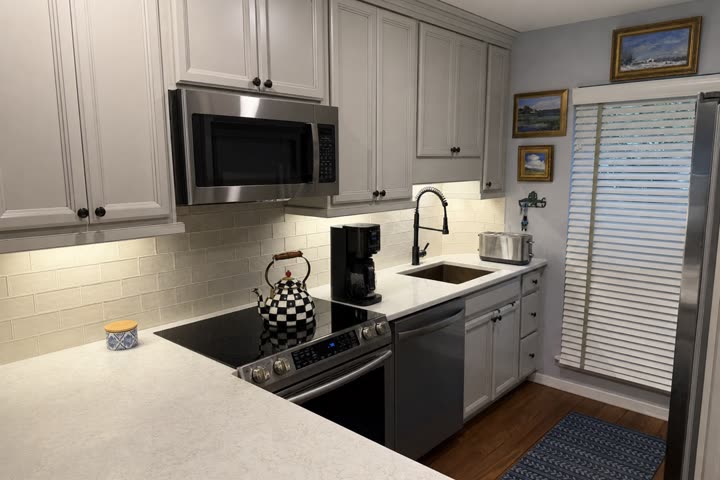
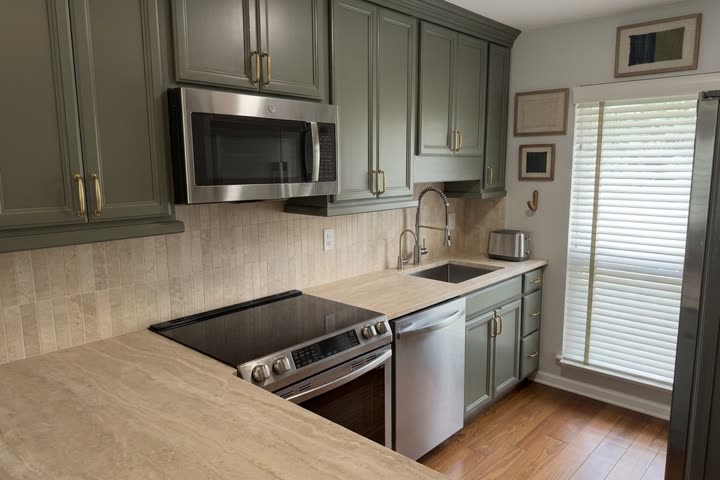
Renovations Lite shows a new look on a photo of the actual room. It helps a buyer picture the house as theirs.

Starting photo of a kitchen, clutter removed: gray cabinets, white counters and a subway tile backsplash.
Starting photo (clutter removed)
The same kitchen redesigned by Renovations Lite with green cabinets, brass pulls and stone counters.
Renovations Lite result · AI concept

Starting photo (clutter removed) and the Renovations Lite result from the app. A design idea, not construction drawings.

Using a concept image in marketing?If you use a concept image in a listing or ad, label it and show the original. Some states and MLSs require it.

Questions agents ask

Before you try it with a client

Can my buyer film during a showing?

Only with the seller’s permission. Check the showing instructions or ask the listing agent first. The briefing is for your buyer and you. Grainwork doesn’t post the video publicly.

Does the walkthrough record sound?

Yes. Your buyer can talk through what they see, and Grainwork uses that narration. Some states require everyone who is recorded to agree, so your buyer shouldn’t record conversations with the seller, the listing agent or other visitors.

Will this scare my buyer off a good house?

It keeps what the camera saw apart from what it couldn’t see, and turns worries into questions for the inspector. You’re there to put it in context.

Does it replace the inspection?

No. The briefing is a planning aid, not an inspection. It lists what the video didn’t show and points your buyer to a licensed inspector.

Who can see my clients’ information?

You, anyone you add to that client (such as a co-agent or transaction coordinator), and the clients who connect with you. Our AI provider, Google, processes the video to write the briefing, and Grainwork may review videos to check accuracy, as our Privacy Policy explains. Managers see counts, like how many homes and clients the team and each agent have. They never see client names, addresses, notes or videos.

Does the briefing talk about the neighborhood or the people who live there?

No. The briefing is built from nine parts of the house: roof, exterior, foundation and structure, water management, windows and doors, heating and cooling, plumbing, electrical, and interior surfaces. It doesn’t describe the neighborhood, schools or the people who live there. If you ever see something that does, tell us and we’ll fix it.

Will you pass my clients to contractors or sell to them?

We never sell leads or client information, and we don’t refer your clients to contractors. Your buyer doesn’t pay for the briefing from your invitation. The Grainwork app also has optional paid extras for homeowners. For example, a Bid Check report, which compares a contractor’s quote with Grainwork’s estimate, is $9.99 on iPhone. Android purchases are coming.

What if my seller learns about a problem from this?

Anything your seller learns about the home may need to be disclosed. Talk it through with your broker before you film one of your own listings.

Does it work with our CRM?

You can copy a short note about a home into your CRM. Automatic CRM sync and MLS feeds aren’t connected yet.

Will my broker approve it?

Brokers usually ask who sees client information, whether buyers may film, and what the briefing covers. Those answers are above. The full details are in our Privacy Policy and Terms. We’re glad to walk your broker or compliance lead through it: email us and say who should join. The link opens your email app. Or write to support@grainwork.app.
Try it with the next few buyers you’re showing homes to.

Email us about a pilot Watch the agent demo

Opens your email app. Or write to support@grainwork.app.